The best local LLM for 32 GB of VRAM: 15 Qwen3.8 27B variants tested
Samuel Batista / November 07, 2026
21 min read • ––– views
After squeezing Qwen3.8 27B onto a single RTX 5070 Ti, I was a bit disappointed with its context window. To fit on one card, I had to run a version quantized to 3 bits, with each of the model's weights stored in about 3 bits instead of the original 16. Even then it held only 120K tokens, just short of the 128K I want for coding. So I decided to upgrade my hardware with a second card and see how far I could push this model. The extra 16 GB turned out to be enough for a 6-bit version, with twice the bits per weight, and the model's full 262K-token window. Equipped with the new hardware, and excited about all the community fine-tunes and variations of Qwen3.8 27B, I was curious to see which one makes the best all-rounder, and how best to configure it for 32 GB of VRAM.
I tested 15 of them against the original model: fine-tunes, other quants, a chat template and a speed setting. Then, because coding is most of what I do, I built a coding test from bugs I'd fixed in my own repositories and ran the closest contenders through it four times each.
None beat the original overall, but the best setup turned out to be two models. The setup I'd run on 32 GB is the base model's 6-bit file for chat and other back-and-forth work, where it's the more careful of the two, and Tess-4.5 for coding agents and subagents that run on their own, because it fixed as many of my bugs as the base model in about two-thirds of the time.
What I was looking for
The model's job is my daily agent work: coding with tools, reading code and documents, and sessions that run long. A replacement had to beat the base model at that whole job, not at one benchmark, so I scored every model on the five things the work depends on, weighted by how much I rely on each: tool calls, long documents, facts, code, and long conversations.
Wrong answers count against a model, because an agent that bluffs costs me more than one that says it doesn't know. I also wanted the model's full capabilities, including its 262K-token window, without overburdening my CPU and RAM, so my machine stays responsive and usable during long-running agent sessions.
The results
Testing all 15 in full would have kept the GPUs busy for about three weeks, so I tested in two stages. First, every model ran a screening run: the same fixed set of about 100 questions drawn from five benchmarks, compared answer by answer with the base model on those exact questions. That takes 3 to 8 hours per model on these cards. The models that looked like they might reach the base model then got a full run: the complete question sets I use, about 1,300 questions, which takes about 40 to 45 hours per model. The scores below are from full runs.
Each score is out of 100, from the five benchmarks weighted as above. How the score is put together.
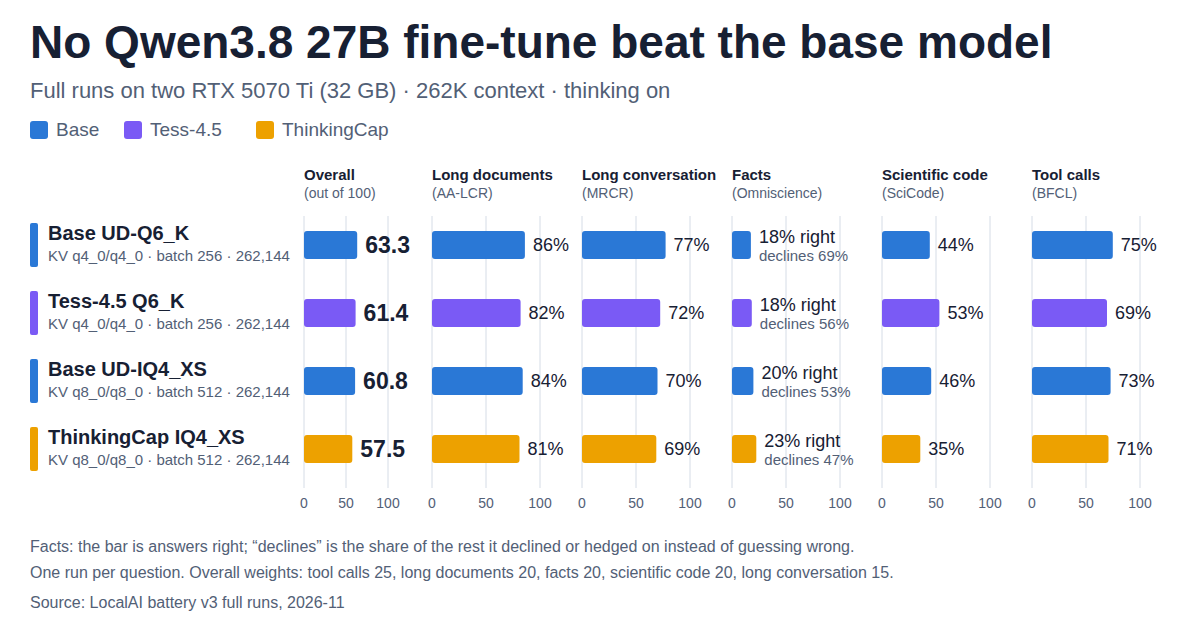
| Model | Score | i AA-LCR (Artificial Analysis Long Context Reasoning): all 100 questions, graded by GPT-5.6 Luna with AA's grading prompt. Long documents | i OpenAI MRCR, 8-needle: 50 conversations up to 230K tokens, scored by sequence match. Long conversation | i AA-Omniscience: 600 questions. "Right" is accuracy; "declines" is the share of the other answers where the model declined or hedged instead of answering wrongly (1 minus the hallucination rate). Facts | i SciCode: a fixed panel of 16 problems (79 steps), each step run against the benchmark's tests. Score is steps passed. Scientific code | i BFCL v4 (Berkeley Function Calling Leaderboard): a fixed 500-question subset, weighted toward multi-turn and parallel calls. Tool calls |
|---|---|---|---|---|---|---|
| Qwen3.8 27B base, 6-bit | 63.3 | 86% | 77% | 17.5% right, declines 69% of the rest | 44% | 75% |
| Tess-4.5, 6-bit | 61.4 | 82% | 72% | 18.3% right, declines 56% | 53% | 69% |
| ThinkingCap, 4-bit | 57.5 | 81% | 69% | 22.5% right, declines 47% | 35% | 71% |
| Qwen3.8 27B base, 4-bit | 60.8 | 84% | 70% | 19.8% right, declines 53% | 46% | 73% |
The other twelve stopped after the screening run; the table below says why for each.
Models tested
The links lead to the Hugging Face pages I downloaded from; the file names are the exact versions I ran.
- Qwen3.8 27B (Unsloth):
Qwen3.8-27B-UD-Q6_K.gguf, the base model everything is compared with, andQwen3.8-27B-UD-IQ4_XS.gguf, its 4-bit file. - Tess-4.5 27B:
Tess-4.5-27B-Q6_K.gguf. - ThinkingCap:
ThinkingCap-Qwen3.8-27B-IQ4_XS.gguf. - Qwopus3.8 27B Coder-Flash:
Qwopus3.8-27B-Coder-Flash-Q6_K.gguf, a coding fine-tune. It stopped after the screening run, but I ran it through the coding test anyway, since coding is what it was made for.
These stopped after the screening run, compared with the base model on the same questions:
| Model | Why it stopped |
|---|---|
Swift 1.5, 6-bit | More wrong answers on facts, weaker tool calls, nothing better |
Swift 1.5 GSQ-RCO, 3-bit | Dropped at screening: clearly behind on tool calls and facts |
Nerkyor Coder390 , 6-bit | Level elsewhere, but made up far more answers on facts |
Pi, 6-bit | Worse on facts, long conversations and code |
DavidAU Fusion , 6-bit | Lowest of all: large losses on long conversations, facts and code |
JetBrains blend, 5-bit | Mixed: better code on a third of the thinking, large loss on facts |
Dirk chat template | Far worse on long conversations; cheap only because it thinks at medium effort |
kaitchup SLQ, 5-bit | Base weights, smaller file: slightly worse, no faster |
agentionai AP, 4-bit | At or below the base model everywhere; no better than Unsloth's 4-bit |
| Base 6-bit with multi-token prediction | Same weights, same quality; a speed question, not a score one |
Qwopus Coder-Flash, 6-bit | Worse on facts and long conversations; level on my coding test |
ThinkingCap, 6-bit | No better than its 4-bit file, which already scored below the base model |
Why a screening run is enough to drop a model.
On my own code, Tess-4.5 got there first
Tess came closest in the full runs, and it's the only model that beat the base model at something my work depends on: it solved 53% of the scientific coding steps against 44%, while thinking less to get there, although most of that gain came from three of the 16 problems. That made me want to see how it handles the coding I actually do, so I built a test from my own work. I took 25 bugs I'd fixed across my own projects, rolled each repository back to just before my fix, and gave the model the bug report and tools to read, search, edit and run the code. The tests I wrote with each fix then decided whether the model had really fixed the bug. I added Qwopus Coder-Flash, a fine-tune made for coding, and ran each model through all 25 bugs four times, because a model rarely solves the same bug the same way twice.
| Model | i My own test: 25 bugs from my repositories (9 easy, 10 medium, 6 hard), each graded by the tests from my fix. Average of four runs. Bugs fixed, of 25 | Worst and best run | Minutes per bug | iTokens the model wrote per bug, thinking included, averaged over the four runs. Tokens per bug |
|---|---|---|---|---|
| Qwen3.8 27B base, 6-bit | 18.0 | 14 to 20 | 13 | 23K |
| Tess-4.5, 6-bit | 18.3 | 16 to 20 | 8 | 14K |
| Qwopus Coder-Flash, 6-bit | 18.5 | 17 to 20 | 12 | 22K |
All three fixed about 18 of the 25, and a single model varied more from run to run than the three differed from each other: the base model's worst run fixed 14 bugs and its best fixed 20. So on quality this is a tie, and 25 bugs can't separate them. What did hold up in every run is time. Tess took about 8 minutes per bug against 13 for the base model, and it isn't faster at writing (both write about 36 tokens per second on these cards): it simply wrote about 40% fewer tokens to fix as many bugs.
The base model is the more careful one
So why not use Tess for everything? Because the full runs found two places where it's less careful than the base model, and mistakes are the types of things I'd notice most in a chat.
The first is tool calls, where Tess scored 69% against 75%. Almost all of the gap sits in multi-turn conversations, where the model works through several requests in a row, calling tools and reading their results. On single requests the two were close (256 against 250 of 300). Across the same 200 conversations, the base model got 42 right that Tess got wrong, and Tess got 21 right that the base model got wrong. In more than half of the 42, Tess made fewer tool calls at the point where the two first went different ways, and the ones I read were shortcuts: it booked a flight without first looking up the airports, described a watchlist without reading it, or reviewed one order when the user had placed two. The base model took the extra step.
The second is facts. The two got about as many right (Tess 18.3%, the base model 17.5%), but on the questions they didn't get right, the base model declined or hedged 69% of the time and Tess only 56%. The rest of the time, they answered wrongly.
The one exception surprised me, and it's the one that matters for coding: on the 100 questions about software, Tess was the careful one. It got fewer right than the base model (19 against 25), but it declined 42 times against 20 and answered wrongly 35 times against 52. So the model I'd hand my code to is also the one less likely to make up facts about software.
In a chat, mistakes and hallucinations can lead me astray and make me lose time. Code and sub-agent output is usually reviewed by other AIs or validated via tests, which makes Tess more worth it for those workloads. On my coding test, whatever shortcuts it took didn't lower its score.
What 4-bit costs the base model
I ran the base model's 4-bit file in full for two reasons. It's the obvious pick if you want speed: it writes about 50 tokens per second against the 6-bit file's 36. And ThinkingCap's file is 4-bit, so comparing the two 4-bit files is the only way to tell what ThinkingCap's fine-tune does apart from what the smaller file does.
The screening run had put the 4-bit file within noise of the 6-bit one on every benchmark, so I expected a small cost. The full run found 2.5 points (60.8 against 63.3), mostly on long conversations (70% against 77%) and in guessing: it declined 53% of the questions it didn't get right, against the 6-bit file's 69%.
ThinkingCap thinks less, and it shows
ThinkingCap promises the same answers with less thinking, and in that sense it delivers on its promise: it thinks less than any other model on four of the five benchmarks, about half as long as the base model on long documents.
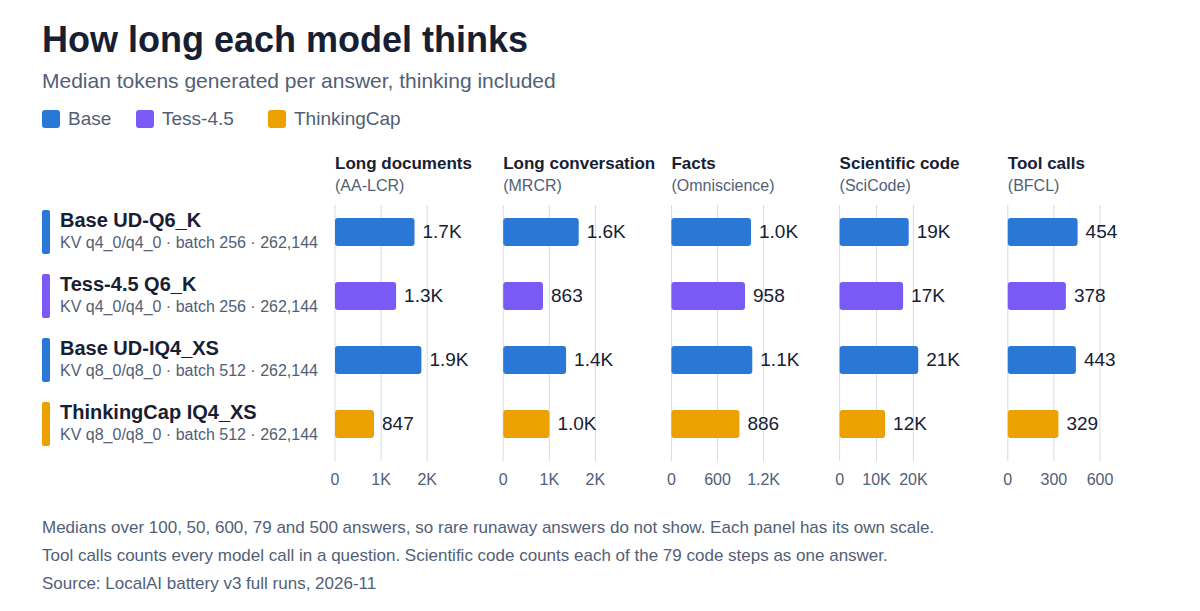
Unfortunately, its answers don't hold up as well. Since its file is 4-bit, I compared it with the base model's 4-bit file from the section above, which is the same size and runs at the same speed. ThinkingCap scored 57.5 against the base model's 60.8. The two were level on long conversations (69% against 70%), but ThinkingCap fell behind on scientific code (35% against 46%), long documents and tool calls. It did get more facts right than the other three models in the full runs (22.5%), but it was also the quickest to guess, declining less than half of the questions it didn't get right. Most of those extra right answers came from guessing: of the 336 questions the base model declined, ThinkingCap answered 146 and got 25 of them right, so for every right guess it gave about five wrong answers. So ThinkingCap does think less, but you give up some accuracy in exchange.
The setup I'd run on 32 GB of VRAM
Based on the results from my benchmarking, my recommendation for AI enthusiasts with 32 GB of VRAM is two models for two kinds of work, both at 6-bit and with the full 262,144-token window:
- The base Qwen3.8 27B for chat and interactive work: conversations where you go back and forth with it, ask questions, or work through something together. It's the more careful model in multi-turn conversations, and the one more likely to say it doesn't know.
- Tess-4.5 for coding agents and subagents: work that runs on its own from a clear task, where nobody is waiting to answer a clarifying question and tests or a review check the work at the end. It fixed as many of my bugs in about two-thirds of the time.
The two don't fit in 32 GB at once, so I load whichever one the job needs. Loading either one takes about 15 seconds on my machine, with the file already cached in RAM.
If you only want to run one model, make it the base model. It's the safer all-rounder: it scored highest overall, it's the more careful one in conversations and with facts, and on my coding test it fixed as many bugs as Tess. What you give up is time, about 13 minutes per bug against Tess's 8, which you'll notice but which won't lead you astray. The exception is if nearly all your use is coding agents running on their own; then Tess alone is the better pick.
The base model, for chat
Here's how I run it:
- File:
Qwen3.8-27B-UD-Q6_K.gguffrom Unsloth, 22.0 GB. - KV cache: 4-bit keys and values (
q4_0). That's 19.2 KiB per token, about 4.8 GiB for the full window. When I compared it with an unquantized cache on this model (its 3-bit file, 16K-token chunks), perplexity moved from 2.4377 to 2.4415, inside the measurement's margin. - Two cards: split by layer, half the model on each.
- Sampling: the model card's thinking-mode settings, with no repetition or DRY penalties.
llama-server -m Qwen3.8-27B-UD-Q6_K.gguf \
  --ctx-size 262144 --n-gpu-layers 999 --flash-attn on --parallel 1 --jinja \
  --split-mode layer --tensor-split 1,1 \
  --cache-type-k q4_0 --cache-type-v q4_0 \
  --batch-size 256 --ubatch-size 256 \
  --temp 1.0 --top-p 0.95 --top-k 20 --min-p 0 \
  --presence-penalty 0 --repeat-penalty 1.0 --dry-multiplier 0
On two RTX 5070 Ti cards it reads prompts at about 790 tokens per second and writes at about 36.
Tess-4.5, for coding agents
- File:
Tess-4.5-27B-Q6_K.gguffrom migtissera, 22.1 GB. - Everything else: the same settings as the base model. Tess is a fine-tune of it, with the same architecture and the same sampling settings on its model card.
llama-server -m Tess-4.5-27B-Q6_K.gguf \
  --ctx-size 262144 --n-gpu-layers 999 --flash-attn on --parallel 1 --jinja \
  --split-mode layer --tensor-split 1,1 \
  --cache-type-k q4_0 --cache-type-v q4_0 \
  --batch-size 256 --ubatch-size 256 \
  --temp 1.0 --top-p 0.95 --top-k 20 --min-p 0 \
  --presence-penalty 0 --repeat-penalty 1.0 --dry-multiplier 0
It reads prompts at about 770 tokens per second and writes at about 36, the same as the base model. Its time savings come from writing less, not writing faster.
Other options
If you want speed over score, use the 4-bit file, Qwen3.8-27B-UD-IQ4_XS.gguf (14.3 GB), with an 8-bit cache (q8_0 for keys and values) and a batch size of 512. It reads at about 930 tokens per second and writes at about 50, for 2.5 points less: it loses most on long conversations (70% against 77%) and answers more questions it doesn't know.
I'd skip the rest, Qwopus Coder-Flash included: it was level on my coding test, and worse on facts and long conversations. Multi-token prediction on the 6-bit file doubles the writing speed, but it needs a smaller window (208K) and reads prompts 30 to 40% slower; I haven't settled whether that trade is worth it.
How this was measured
How do I reproduce these results?
Hardware. Two RTX 5070 Ti cards (16 GB each) on Windows 11, with the model split by layer across both. llama.cpp was the upstream build b11064, which I compiled from source for these cards with the flash-attention kernels for the quantized caches turned on. The only change to the source is a small patch that reports which GPUs served each response; it doesn't touch the model's output. The cache types in this post (q4_0 and q8_0) also run on the prebuilt b11064 release, though I measured speeds only on my own build.
Models and settings. The exact files are linked under Models tested, and the launch settings are in the setup I'd run. Every model got the same sampling: temperature 1.0, top-p 0.95, top-k 20, no repetition or DRY penalties, thinking on at the highest reasoning effort (except under the Dirk template, which sets medium), and up to 98,304 tokens per answer. Every model ran split across both cards with the full 262,144-token window, except multi-token prediction (208K). In the four full runs, the 6-bit files used a 4-bit KV cache and a batch size of 256; the 4-bit files used an 8-bit cache and 512.
Benchmarks. All five ran through NVIDIA's NeMo-Skills (commit bcf059a), which supplies each benchmark's standard prompts and scoring. Requests went one at a time, with seed 42:
- AA-LCR: all 100 questions.
- MRCR: 50 eight-request conversations, up to 230K tokens.
- AA-Omniscience: 600 questions.
- BFCL v4: a fixed 500-question subset.
- SciCode: a fixed panel of 16 problems (79 steps), in a network-off container.
The fact and long-document answers were graded by GPT-5.6 Luna with Artificial Analysis' published grading prompts. The whole harness is open source in my LocalAI repository: the benchmark runner, the screening questions, the SciCode panel and the script that picks the 500 BFCL questions.
Coding test. My own, built from my own projects, which aren't public, so it can't be reproduced as is, though the test harness is open source too; how it works is in its own question below. It used the same files, launch settings and sampling as above.
What may not carry over:
- One 32 GB card. Everything ran on two 16 GB cards. A single 32 GB card holds the same bytes, but I haven't run it, and speeds will differ.
- The llama.cpp build. Speeds depend on it; scores should depend on it far less.
- One run per question. A rerun can move a score by a few points, most of all scientific code. The coding test ran four times for that reason.
- Subsets, not full benchmarks. BFCL and SciCode use fixed subsets, so these numbers don't line up with public leaderboards.
- The grader. A different grading model would score the fact and long-document answers somewhat differently.
What do the five benchmarks test?
- Long documents is AA-LCR: 100 questions, each answered by reading and reasoning across a set of long documents.
- Long conversation is MRCR: a long chat holds several similar requests, and the model has to reproduce the response to a specific one. I used 50 conversations with eight such requests each, up to 230K tokens.
- Facts is AA-Omniscience: 600 knowledge questions where declining to answer is allowed. "Right" is the share answered correctly; "declines" is how often the model declined instead of answering wrongly when it didn't get it right.
- Scientific code is SciCode: research problems in physics, chemistry, biology and math, each split into steps, every step checked by running the model's code against the benchmark's own tests. I used a fixed panel of 16 problems (79 steps) drawn across short, medium and long problems.
- Tool calls is the Berkeley Function Calling Leaderboard v4: a fixed 500-question subset, weighted like Artificial Analysis' toward multi-turn conversations (200), where the model calls tools and reads their results, and several calls at once (120), plus single calls and questions where no tool fits.
How does the coding test work?
Each of the 25 tasks is a bug I fixed in one of my repositories, picked so that my fix came with a test that fails before it and passes after.
- The repository goes back to the commit just before my fix, so my new test isn't there yet.
- The model gets a bug report describing what goes wrong, and tools to list, read, search, edit and write files and to run shell commands (so it can run the project's own tests), plus one to say it's done. It has up to 40 tool calls and 25 minutes.
- When it stops, my test from the fix is put back and run against its changes. The task counts as fixed only if every test that my fix made pass also passes for the model.
Two checks keep the test honest: applying my own fix passes all 25 tasks, and changing nothing passes none.
The tasks are 9 easy, 10 medium and 6 hard. Every model ran all 25 four times, with the same sampling as the benchmarks.
Did the base model and Tess fix the same bugs?
Mostly, yes. Over four runs each, Tess fixed all 25 bugs at least once and the base model 23. On the 23 both fixed, Tess was faster on 19, about 7 minutes per bug against 12 (counting only runs that fixed it).
They don't make up for each other's misses either: giving each bug to both and keeping whichever fix worked solved 22.4 of 25 on average, about the same as giving it to Tess twice (22.3). So Tess is a faster stand-in for the base model, not a complement.
How is the score put together?
Each benchmark's result is multiplied by a weight and the five are added: tool calls 25, long documents 20, facts 20, scientific code 20, long conversation 15. The facts weight is split two to one between answering correctly and avoiding wrong answers, so a model that guesses pays for it, but less than it would for not knowing.
The weights reflect what I use a local model for: agent work with tools, reading code and documents, and long sessions.
Why is a screening run enough to drop a model?
Because every model answers the same questions, each answer can be compared with the base model's answer to that exact question, which removes most of the luck of which questions came up. On about 100 questions instead of 1,300, that predicts the full score to within about 6 points: enough to drop models that are clearly behind, not to separate close ones.
Tess and ThinkingCap looked close enough for a full run, and I also ran the base model's 4-bit file in full, to separate ThinkingCap's fine-tune from its smaller file. The screening run had put ThinkingCap at 62.1; its full run came in at 57.5, inside that range but the biggest miss so far.
Made with Claude Opus 5.5, GPT-6 Astra, GPT-5.6 Luna, Bun, Python, llama.cpp, NeMo-Skills, Docker and VS Code.